

If you have forgotten the password for a DVR or NVR based on Xiongmai Technology, you may be able to reset the password using the QR CAPTCHA recovery method.
This method uses the CCTV Super Password app to generate a verification code from the QR CAPTCHA displayed by the DVR.
Note: The exact interface and available recovery options may vary depending on the DVR/NVR model and firmware version.
Step 1: Open the DVR Login Screen
Go to the login screen of your DVR or NVR.
Click Forgot Password or the corresponding password recovery option.

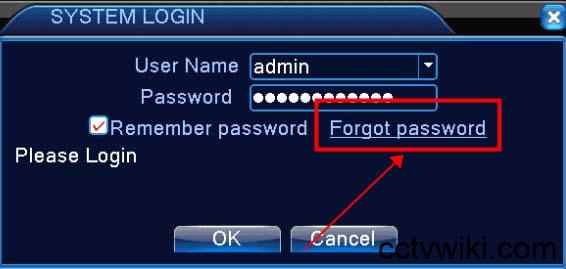
Step 2: Select “Forgot Answer”
On the password recovery screen, select:
Forgot Answer
The DVR will display the available password recovery options.

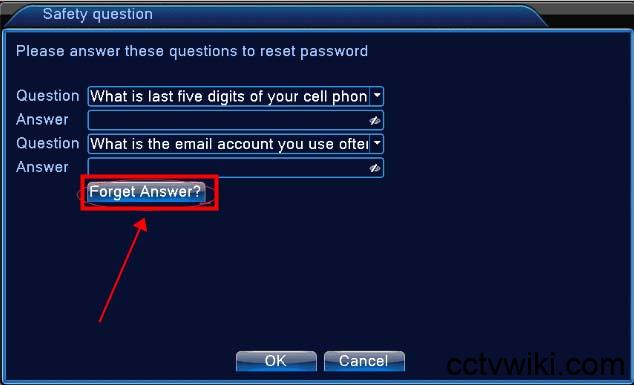
Step 3: Select “Reset with QR Captcha”
Look for the QR CAPTCHA recovery option and select:
Reset with QR Captcha
The DVR will display a QR CAPTCHA that will be used to generate the verification code.

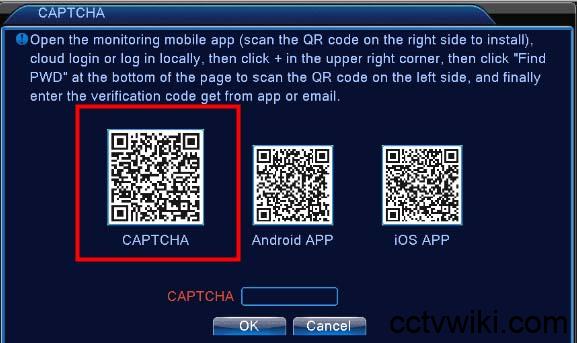
Step 4: Open CCTV Super Password
Open the CCTV Super Password app on your phone.
From the manufacturer or device list, select:
Xiongmai Tech
Then select:
Reset with QR Captcha
Step 5: Scan the QR CAPTCHA
Use the camera/scanner in CCTV Super Password to scan the QR CAPTCHA displayed on the DVR screen.
Make sure the entire QR code is visible and clearly focused within the scanning area.
Step 6: Generate the Verification Code
After the QR CAPTCHA has been successfully scanned, CCTV Super Password will process the QR information and generate the corresponding verification code.
Enter the generated code into the appropriate Captcha field on the DVR.

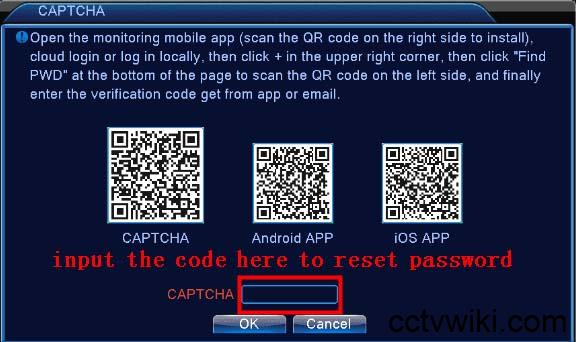
Step 7: Confirm the Password Reset
After entering the verification code, confirm the reset operation on the DVR.
If the code is valid and the DVR firmware supports this recovery method, the password reset process should be completed successfully.
You can then return to the login screen and try logging in with the reset credentials.
Important Notes
- Not all Xiongmai DVR/NVR models support QR CAPTCHA password recovery.
- The menu names and interface may vary between different firmware versions.
- The QR CAPTCHA must be scanned directly from the DVR/NVR screen.
- The verification code is generated based on the information contained in the displayed QR CAPTCHA.
- If the generated code does not work, verify that you selected Xiongmai Tech → Reset with QR Captcha in CCTV Super Password and that the QR code was scanned correctly.
- If this method is unavailable or unsuccessful, check the device model and firmware version or contact the equipment manufacturer/distributor for assistance.
- Only use this procedure on a DVR/NVR that you own or are authorized to manage.
Quick Summary
The complete process is:
DVR/NVR → Forgot Password → Forgot Answer → Reset with QR Captcha → CCTV Super Password → Xiongmai Tech → Reset with QR Captcha → Scan QR CAPTCHA → Generate Code → Enter Captcha → Reset Password
This provides a convenient way to recover access to compatible Xiongmai DVR/NVR devices without using the standard xMeye password recovery procedure.